How to Find World-Writable Files in Linux
Find world-writable files and directories in Linux with find, work out which ones are a privilege-escalation risk, and fix them without breaking anything.
A file that any user on the system can modify is a problem when something more privileged runs it or reads its configuration. A cron script owned by root but writable by everyone is a textbook privilege-escalation path.
Finding these files takes one command. The harder part is knowing which results matter, and fixing them without breaking something that depends on them.
What Are World-Writable Files?
A file is world-writable when the write bit is set for “others” (o+w, or -rw-rw-rw- in ls -l). Any local user can change it.
On directories the effect is different: anyone can create, delete or rename entries inside, unless the sticky bit is set. And world-writable doesn’t automatically mean exploitable. /tmp is world-writable on purpose.
Find World-Writable Files in Linux
Run these as root so unreadable directories don’t hide results:
# world-writable files
sudo find / -xdev -type f -perm -0002 -ls 2>/dev/null

# world-writable directories, excluding sticky ones (the normal /tmp case)
sudo find / -xdev -type d -perm -0002 ! -perm -1000 -ls 2>/dev/null
What the flags do:
-type f/-type dselects files or directories.-perm -0002matches any file with the others-write bit set.! -perm -1000drops directories with the sticky bit, which stops/tmpand/var/tmpdrowning out everything else.-lsprints owner, mode and path in one line, so you don’t need a second command per hit.2>/dev/nullhides permission-denied noise.
-xdev keeps find on one filesystem, which skips /proc, /sys and /dev. It also skips any separately mounted filesystem, such as a dedicated /var or /home. Run the same command against each mount point to cover them.
To focus on the places where a hit is most dangerous, narrow the search:
sudo find /etc /usr /opt /var/www -xdev -type f -perm -0002 -ls 2>/dev/null
Assess Findings Before Changing Permissions
A result like this is worth your attention:
131090 8 -rwxrwxrwx 1 root root 8192 Oct 15 14:02 /var/www/scripts/run.sh
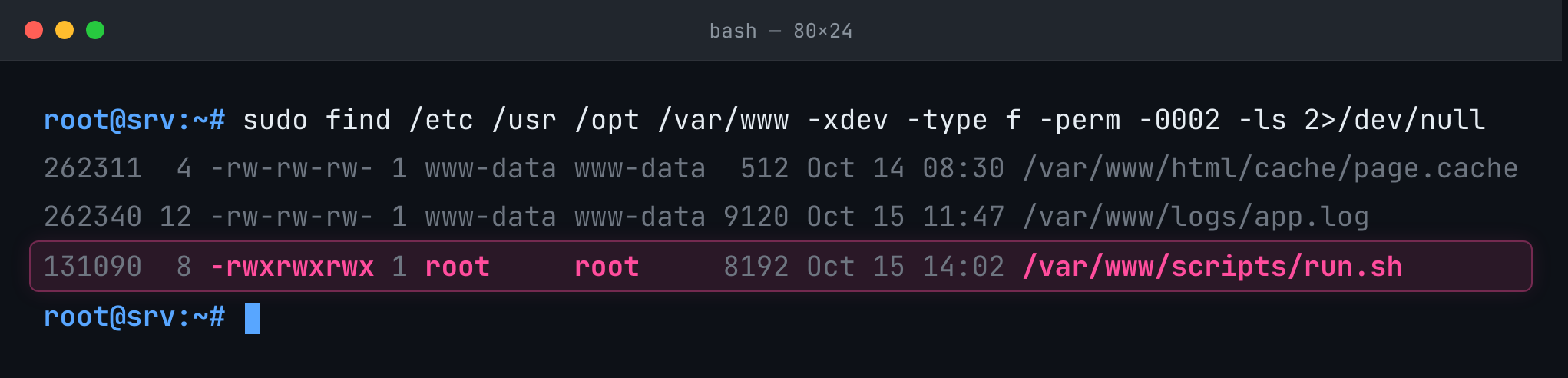
It’s an executable owned by root that anyone can edit. Now check whether anything privileged actually runs it:
grep -r "run.sh" /etc/cron* /etc/systemd 2>/dev/null
A world-writable file is a signal, not a verdict.
What decides the risk is what runs it, or reads it, with more privilege than the person who can edit it. A world-writable log file is noise. A world-writable script called by root’s crontab is the finding.
For each hit, ask:
- Who owns it, and where does it live? System paths and application directories matter more than a scratch file in a home directory.
- Is the write access intentional? Some applications set it deliberately.
- Does a privileged process use it? Scripts, config files, executables and anything in a
$PATHdirectory are the priority.
Rank findings by what an attacker could do with them, not by the permission bits alone.
Remediate Carefully
Blanket fixes like chmod -R o-w / will break things. Instead:
- Confirm with the system or application owner what access is actually needed.
-
Apply the narrowest change that restores the boundary:
sudo chmod o-w /var/www/scripts/run.sh - Test the application or job afterwards.
Discover, assess, prioritize, then remediate. World-writable is only one kind of risky permission — next in this Linux audit series: who has sudo access, and which binaries run with elevated privileges.